FluteKeyboard
A customizable, multi-language Virtual Keyboard for Flutter Embedded Projects

Try It Live
This is the real keyboard running as a Flutter web app — type, long-press for accents, and switch languages and layouts.
Click inside the frame to interact. Open full screen ↗
Why FluteKeyboard?
FluteKeyboard brings a flexible, easy-to-integrate virtual keyboard for embedded Flutter projects, enabling developers to create intuitive and responsive input experiences on touch-based devices.
Multi-Language
9 built-in layouts — English, Italiano, Deutsch, Français, Español, Português, Polski, Nederlands, Čeština — switchable at runtime with the language picker key.
Long-Press Alternatives
Accented characters and symbols in a press-and-hold popup, with optional secondary hints shown directly on the key face.
Custom Layouts
Define your own alphanumeric and numeric key arrangements, including blank keys for grid spacing.
Fully Themable
Colors, text styles and icons are all configurable through FluteKeyboardTheme.
Symbol Pages
Two symbol pages with punctuation, currency and special characters, plus a dedicated numeric keypad mode.
Zero Dependencies
Pure Flutter widgets with no third-party packages — lightweight and ideal for embedded and kiosk devices.
Get Started
Add the package to your project and drop the widget into your app.
flutter pub add flutekeyboardfinal theme = FluteKeyboardTheme()
..backgroundColor = const Color(0xFFD1D3D7)
..btnBackgroundColor = Colors.white
..btnTextStyle = const TextStyle(color: Colors.black, fontSize: 28);
FluteKeyboard(
type: FluteKeyboardType.alphanumeric,
textController: _textController,
theme: theme,
alphanumericLayouts: const [FluteLayout.en, FluteLayout.it, FluteLayout.de],
showSecondaryValues: true,
shiftIcon: 'assets/shift.png',
shiftActiveIcon: 'assets/shift_active.png',
backspaceIcon: 'assets/backspace.png',
languageIcon: 'assets/language.png',
onReturn: () => print(_textController.text),
)Screenshots
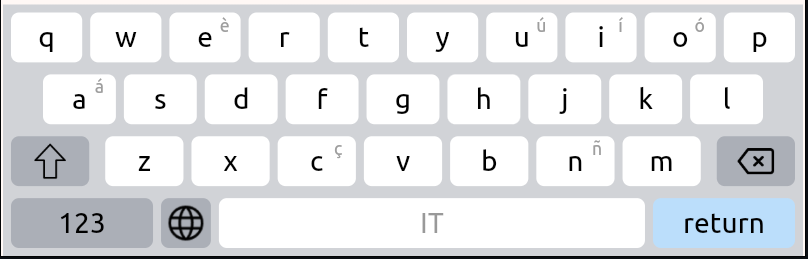
Built-in Layout
QWERTY-style layout with secondary key hints and the language picker key.
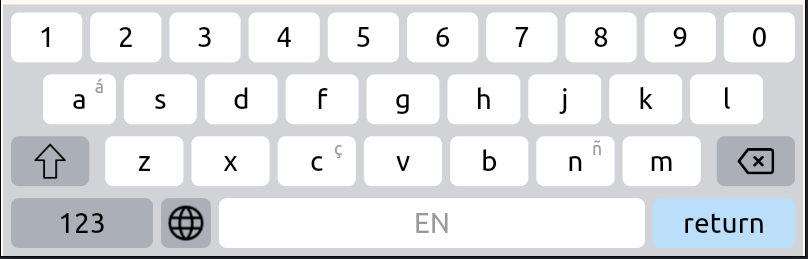
Custom Layout
Tailor-made key arrangement with a dedicated digit row.